Payout
Overview
Payout is a payment type which uses one request to make a one-time transfer of funds from merchant to customer.
Basically, the payment platform performs payouts on demand (one-time payments); though, you can implement bulk payouts by using Dashboard. In the latter case, you can have the required payouts generated automatically. For more information about bulk payouts, see .
Basically, payout initiation request contains payment instrument details. However, if you perform payout on a payment card you can perform payout by token that is associated with the payment card details. To enable this option, merchant must comply with the PCI DSS standard and you need to perform an initial payment (purchase) to create a token. For more information about using tokens, see Using tokens
The payout workflow
To perform a payout by using Gate the web service is required to do the following:
- Send the payout request to the following endpoint
/v2/payment/card/payout[/token]. - If necessary, complete the additional procedure of payment information submission that is used when any payment stakeholder requires additional information. For more information, see Submission of additional payment information.
- Receive the callback with payout results from the payment platform.
The following diagram provides the information about the basic payout processing case (without the completion of the additional procedure).
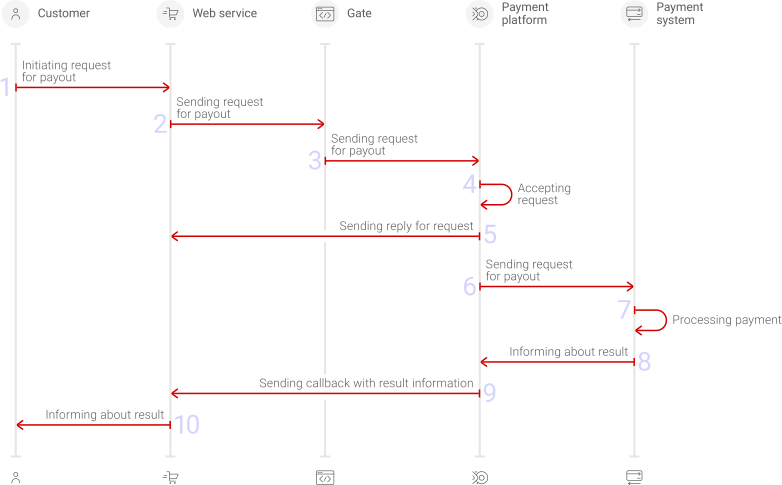
Figure: Payout processing by using Gate
- A customer initiates a payout.
- The web service sends the payout request by using Gate to the payment platform.
- The payment platform receives the payout request.
- The payment platform performs the initial request processing that includes validation of the required parameters and signature.
- The payment platform sends to the web service the response with request receipt confirmation and correctness check result.
- The payment platform performs the internal payment request processing and sends it to the payment environment.
- The payout is processed on the payment service side.
- The payment platform receives the payout result notification.
- The payment platform sends the callback to the web service.
- The customer receives the payment result from the web service.
The sections that follow discuss in more details the request format and the parameters to be used in requests for payouts to payment cards, as well as provide information about the format of callbacks which contain payout results.
Request format
There are several things you need to consider when using payout requests to payment cards:
- You perform payout by sending the request by using POST (HTTP) method to one of the following endpoints:
- when making a payout by card number—/v2/payment/card/payout,
- when making a payout by the token that is associated with payment card details—/v2/payment/card/payout/token,
- The following objects and parameters must be specified in the request:
- Object general—object with general request identification information:
- project_id—the project ID obtained from ITX
- payment_id—payment ID unique within the merchant project
- signature—signature created after you specify all the required parameters. For more information about signature generation, see Signature generation and verification
- Object customer—object with customer information:
- id—the ID of the customer within the merchant project
- first_name—customer first name
- middle_name—customer middle name or patronymic
- last_name—customer last name
- ip_address—IP address
Note: The first name, the middle name (or patronymic), and the last name of the customer must be specified for all cards with the exception of those issued in the Russian Federation. For the latter, passing these parameters is not required. - Object payment—payment information:
- amount—payout amount in minor currency units without any decimal point or comma except for cases where the currency does not have any minor currency units. If the currency has no minor units (that is, the number of digits for minor currency units is zero), then you must set this parameter to the amount in the major currency units. For the information on whether the currency has any minor units, see Currency codes.
- currency—payout currency in the ISO-4217 alpha-3 format
- Object general—object with general request identification information:
- The request must contain the following information about the payment card to be used in the payout:
- card—object with the payment card information:
- pan—card number. This parameter is required if the payout is made using the card number.
- month—month of the card expiration date. This parameter is required if the request contains the best_before parameter in the payment object. In general, the parameter is optional, although it may be required in some situations, therefore we strongly recommend to consult with your account manager at ITX.
- year—year of the card expiration date. This parameter is required if the request contains the best_before parameter in the payment object. In general, the parameter is optional, although it may be required in some situations, therefore we strongly recommend to consult with your account manager at ITX.
- card_holder —cardholder name as specified on the card. This parameter is required if the payout is performed by using the card number or if the payment is made by using a token and it is impossible to get the cardholder name based on the token.
- token—card token. This parameter is required if the payout is made using the card token.
- card—object with the payment card information:
- If you pass the payment expiration parameter payment.best_before, you must also pass the card expiration parameters: card.month and card.year.
- If required, you can also add any other additional parameters and objects Gate supports.
Figure: Example of a payout request
{
    general: {
        project_id: 874,
        payment_id: "1553840734526111",
        signature: "1wR1YgDoDlJppOdLzFOFKY4YonbWmspbFh7x1o1ut5PxxTIJfQ==",
    },
    // Card number when payout by the card number
    card: {
        pan: "123456123456"
    },
    customer: {
        id: "1",
        ip_address: "185.123.193.224"
    },
    payment: {
        amount: 15000,
        currency: "EUR"
    },
    // Card token when payout by the token
    token: "pkmawa3khb7wninntq8g8q3592fjjxwvzfebwbegqkl1c16akpgo6sgxac6wulz7"
}
Callback format
The standard format for callbacks is used to deliver payout results. For more information, see Callbacks in Gate.
The following is the example of a callback with an information about successful 100.00 USD payout made to the card number 553691******0802 of the customer_10 customer in the 874 project.
Figure: Example of a successful payout callback
{
    {
        "project_id": 874,
        "payment": {
            "id": "3013",
            "type": "payout",
            "status": "success",
            "date": "2019-06-24T11:08:49+0000",
            "method": "card",
            "sum": {
                "amount": 10000,
                "currency": "USD"
            },
            "description": "payout"
        },
        "account": {
            "number": "553691******0802"
        },
        "customer": {
            "id": "customer_10"
        },
        "operation": {
            "id": 14,
            "type": "payout",
            "status": "success",
            "date": "2019-06-24T11:08:49+0000",
            "created_date": "2019-06-24T11:07:42+0000",
            "request_id": "71228f54d21e776a481",
            "sum_initial": {
                "amount": 10000,
                "currency": "USD"
            },
            "sum_converted": {
                "amount": 10000,
                "currency": "USD"
            },
            "provider": {
                "id": 1496,
                "payment_id": "60-1c6072de6000",
                "date": "2019-06-24T11:08:47+0000",
                "auth_code": ""
            },
            "code": "0",
            "message": "Success"
        },
        "signature": "+GTEzb3Xw4A9Ap8q/LE8TyyJM+TaK4UzSgifLxgB6c9TSeb/peLxw=="
    }
}
The following example of callback is for a payout rejected due to the maximum payout limit being exceeded.
Figure: Example of a declined payout callback
{
    {
        "project_id": 874,
        "payment": {
            "id": "3013",
            "type": "payout",
            "status": "decline",
            "date": "2019-06-24T11:08:49+0000",
            "method": "card",
            "sum": {
                "amount": 10000,
                "currency": "USD"
            },
            "description": "payout"
        },
        "account": {
            "number": "553691******0802"
        },
        "customer": {
            "id": "customer_10"
        },
        "operation": {
            "id": 14,
            "type": "payout",
            "status": "decline",
            "date": "2019-06-24T11:08:49+0000",
            "created_date": "2019-06-24T11:07:42+0000",
            "request_id": "71228f54d21e776a481",
            "sum_initial": {
                "amount": 10000,
                "currency": "USD"
            },
            "sum_converted": {
                "amount": 10000,
                "currency": "USD"
            },
            "provider": {
                "id": 1496,
                "payment_id": "60-1c6072de6000",
                "date": "2019-06-24T11:08:47+0000",
                "auth_code": ""
            },
             "code": "3104",
            "message": "Payment Constraint Invalid Payout Amount"
        },
        "signature": "+GTEzb3Xw4A9Ap8q/LE8TyyJM+MEXXja28RXtr8v2EITaK4UzSg...=="
    }
}